Difficulty
Very easy
Steps
3
Time Required
- Setting up Macros on the Duet 3 steps

In Progress
This guide is currently being written. Reload periodically to see the latest changes.

Private
This guide will not appear in search results and can only be viewed by team members!
Quiz
0
-
-
Click on the "Macros" link on the left of the screen to enter the Macro list.
-
Click the button on the right labled "Make new..." and on the drop down menu that appears, click "Macro".
-
You will be prompted to name the macro. Enter a name in the box and click OK.
-
-
-
Select the gcode you want to run when the macro is executed. Right click on the selected text, and click "Copy".
-
Right click on the text area for the macro and click "Paste". Make sure all the text is correct, then click "Save Changes"
-
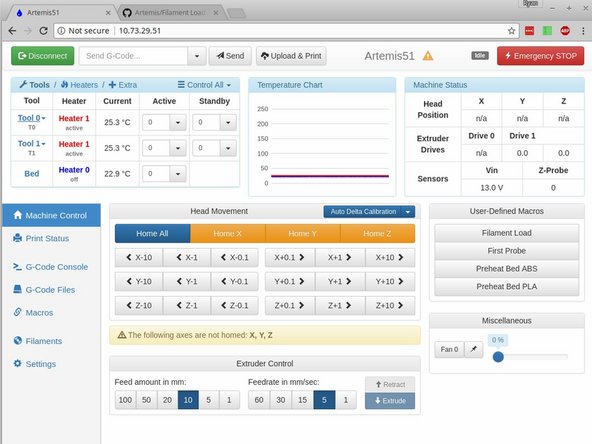
The Macro is now available to run from the macro list, or from "Machine Control" tab under "User-Defined Macros"
-
-
-
If you already have your macro saved to a file on your computer, you can upload it directly.
-
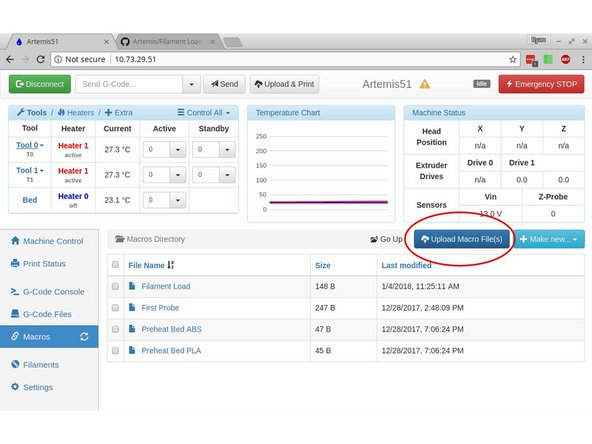
Click on the "Macros" tab on the left, then on "Upload Macro File(s)" on the right.
-
Select your macro(s) for uploading.
-
They will now be available in the macro list and under "User Defined Macros" on the Machine Control tab.
-